Manage, organize, and share folders
Use the More Options menu (three dots) to view and perform actions on a folder. The options in this menu allow you to manage, organize, and interact with your folder directly from the workspace.
The More Options menu for folders is available on multiple pages:
- Workspace (Personal and Organization)
- Recent page
- Starred page
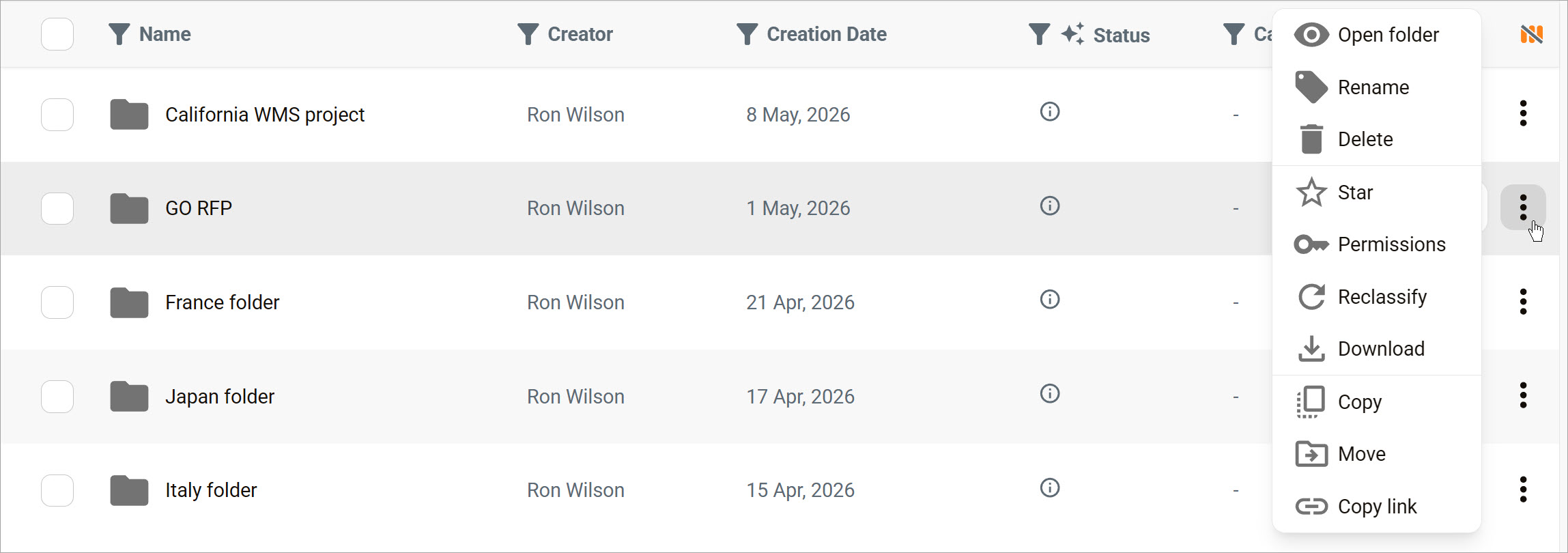
Menu options
Open folder
Open the folder in the same window. Continue working without leaving the page.
Rename
Change the folder name without affecting its contents.
Delete
Permanently removes the file from the system. This action cannot be undone.
Star
Add a link to the folder to the Starred page for easy access.
Permissions
Control who can view or edit the folder. Learn more about permissions.
Reclassify
Change the folder classification or category for organization or compliance.
Download
Save a copy of the folder to your device.
Copy
Create a duplicate of the folder.
Move
Transfer the folder to a different folder or location.
Copy link
Copy a direct URL to the folder so you can share it.