Draft, organize, and share content
The Personal Workspace is a private area. It’s designed for individual work, drafts, and content you’re not ready to share. By default, the files and folders are private. Anything you create or upload here is only visible to you unless you choose to share it.
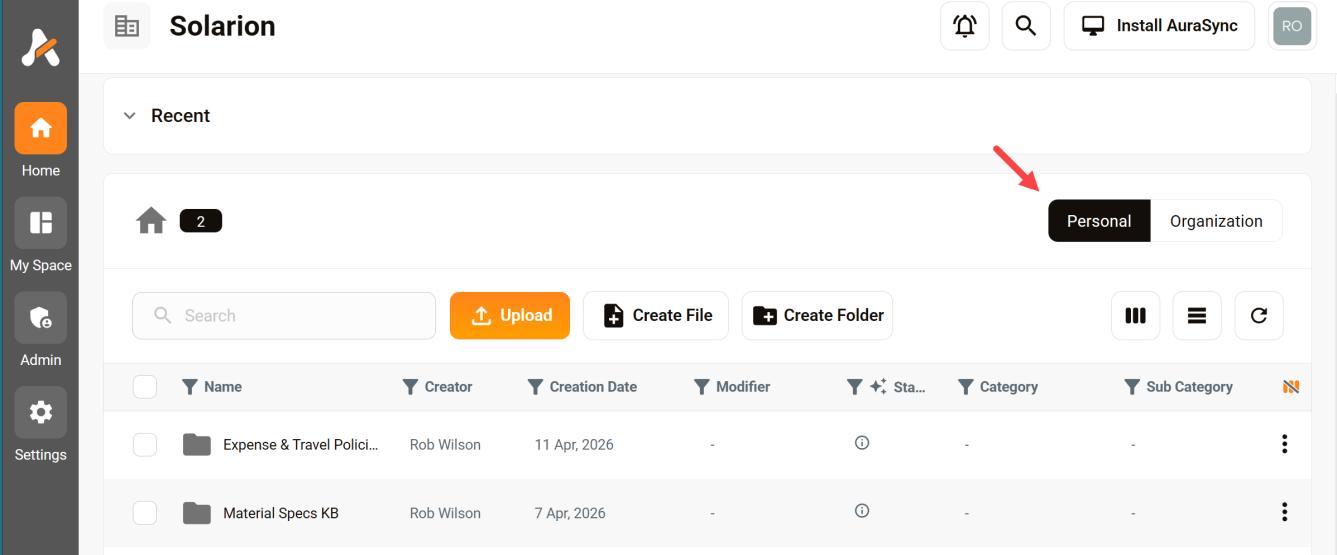
Opening your Personal Workspace
Click the Home button in the side menu and then click the Personal button.
Use the space for:
- Draft content
- Personal notes
- Early-stage projects
- Files you don’t want visible to your team
Sharing files and folders
You can share individual files or folders from your Personal Workspace by assigning new permissions. When you share something:
- You control who gets access.
- You can set permissions (view or edit).
- The item becomes accessible without moving it out of your workspace.
Sharing a file does not move it out of your Personal Workspace. Instead:
- The file remains owned by you.
- Other users gain access based on your sharing settings.
- You can revoke access at any time.
Moving files and folders
You can move files or folders from your Personal space to the Organization Workspace if you want to make them part of a shared team environment.
Keep in mind:
- Once moved, access is governed by organization-level permissions
- Ownership and visibility rules may change.