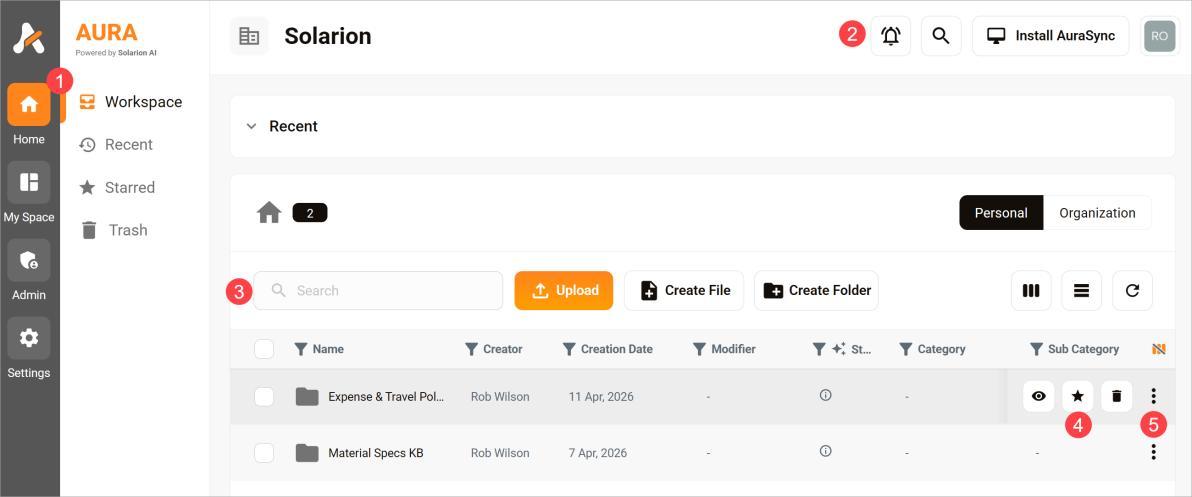
Learn where to take action
The Home page is your main entry point into the platform. It provides access to search, content, and key actions across your workspace.
What you’ll find on the Home page
Depending on your setup, the page may include:
- Home. Click this button return to the main workspace. Click it again to show or hide the sub-menu (Workspace, Recent, Starred, and Trash).
- Toolbar: These tools are always visible. Use the toolbar to view notifications, enable the Global Search and Ask AI tool, install AuraSync, or access your account settings.
- File/Filter Search. Use this tool to sort and filter the folders and files shown in the table.
- File/Folder buttons: Hover a row in the table to display these icons. Use these tools to preview a file (and display saved chats), star an item for quick access, or delete the item.
- More options menu: Click the three-dot icon to display a menu of options. Available options vary depending on whether you select a file or a folder.