Collaborate with teams
The Organization Workspace is a shared environment where teams can access, manage, and collaborate on files. Content in this workspace is available to other members of the organization based on permissions.
Opening the Organization Workspace
Click the Home button in the side menu and then click the Organization button. The workspace displays the files and folders you have permission to access. Unlike the Personal Workspace, content here is not private by default. Visibility is determined by organization and folder-level permissions.
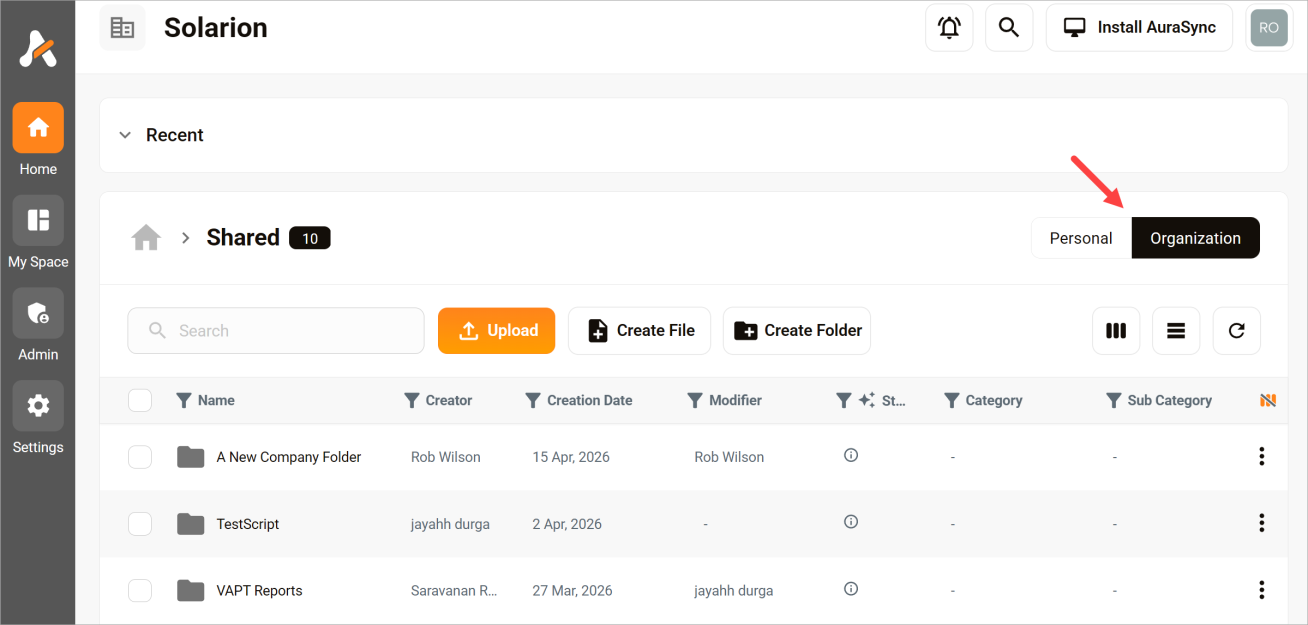
Use the space to:
- Share files across teams
- Collaborate on projects
- Maintain a single source of truth
- Manage content with consistent access controls
Sharing files and folders
Access depends on permissions set at the organization, folder, or file level. Permissions are managed by workspace owners or administrators.
Depending on configuration:
- Some content may be visible to all members.
- Some content may be restricted to specific users or teams.
Files and folders in the Organization Workspace are already part of a shared environment, but you can still manage access.
When adjusting permissions:
- You control who can view or edit content.
- You can grant access to individuals or groups.
- You can restrict sensitive content as needed.
Changes to permissions take effect immediately.
Moving files and folders
Admins can move files or folders from one folder to another within the same Organization Workspace or to the admin's Personal Workspace. It's not possible to move content from Organization Workspace to another user's Personal Workspace.
To move content:
- Select the file or folder.
- Click the three-dot icon.
- Choose the Move menu option.
- Select the destination folder inside the Organization Workspace or Personal Workspace.
When an admin moves content to another folder within the Organization Workspace, access is governed by the new folder's permissions. When an admin moves content to their Personal Workspace, access is governed that space's permissions. In addition, ownership of the content changes to the owner of the Personal Workspace.