Stay up to date automatically
AuraSync connects your workspace to your desktop. You can edit documents with apps on your device, such as Microsoft Word. When you save a file, AuraSync uploads your changes and keeps everything in sync.
Edit a document
If the AuraSync app is not visible, open it from the system tray (Windows) or the menu bar (macOS).
- Go to your Personal or Organization workspace.
- Locate the document you want to edit.
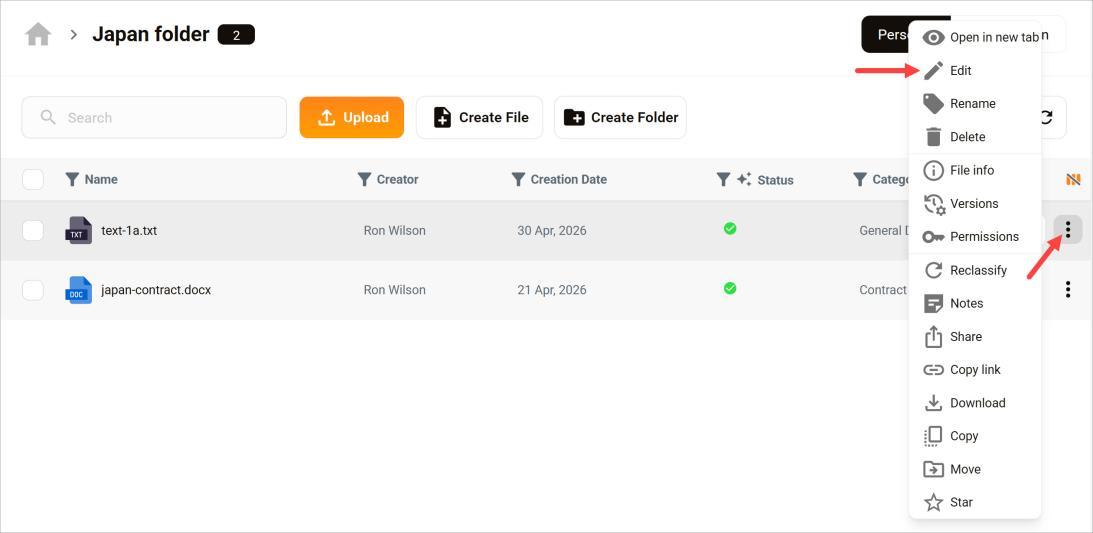
- Click the three-dot icon.
- Select the Edit menu option. AuraSync downloads the file to your device and opens it in the appropriate app automatically.
- Make your changes.
- Save the file.
AuraSync uploads your changes back to the platform in the background.
Confirm changes
- Click the three-dot icon next to the document.
- Click Open in new tab.
The document opens in your browser and shows your changes. Large documents may take one or two minutes to sync.